The Git client Linux deserves.
Palace is a fast, beautifully simple Git client for Ubuntu and other Linux desktops, and now for macOS too. Free and open source.
Version 0.16.0 · Linux and macOS · MIT licensed
History
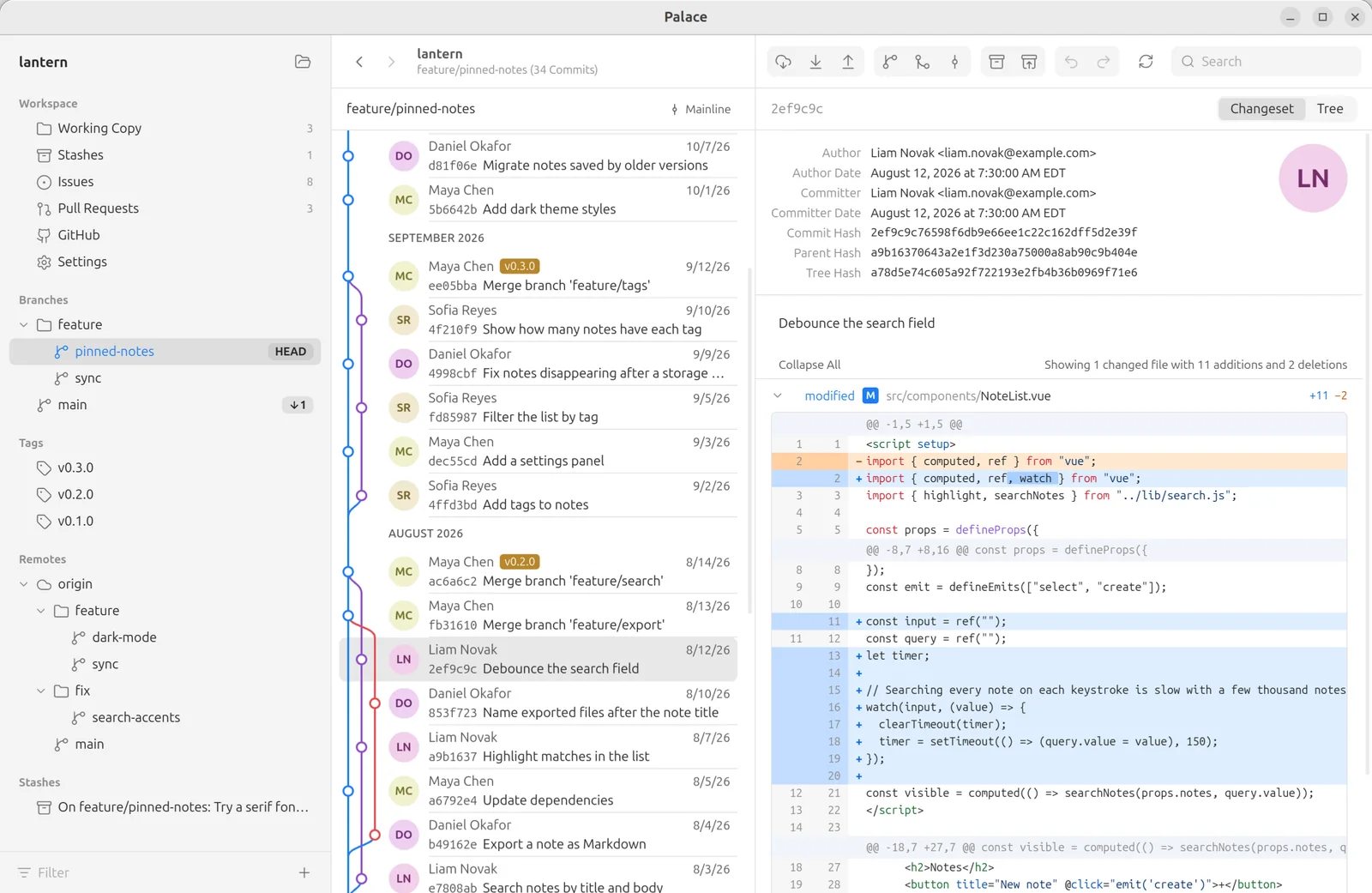
See your whole history.
Every commit on a clear branch graph, grouped by month. View HEAD or any branch, remote branch, tag or stash.
- Author, dates, refs and message, with a diff for every changed file.
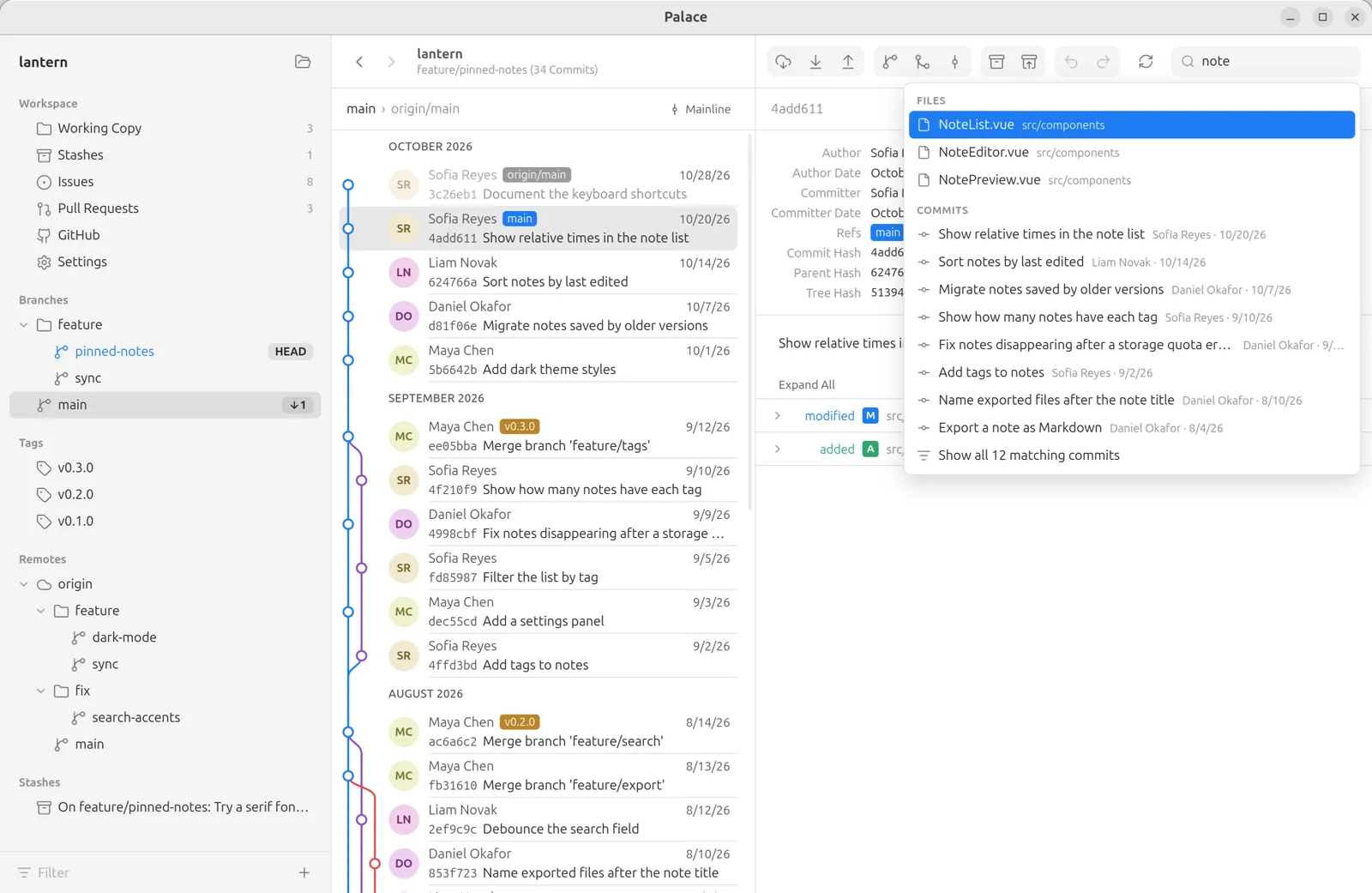
- Ctrl+F searches files and commits together, by message, author or hash.
- Browse any commit's file tree, see a file's history, and blame it line by line.
- Busy history with dozens of branches? Mainline shows each merge as one commit, in a straight line.
Working copy
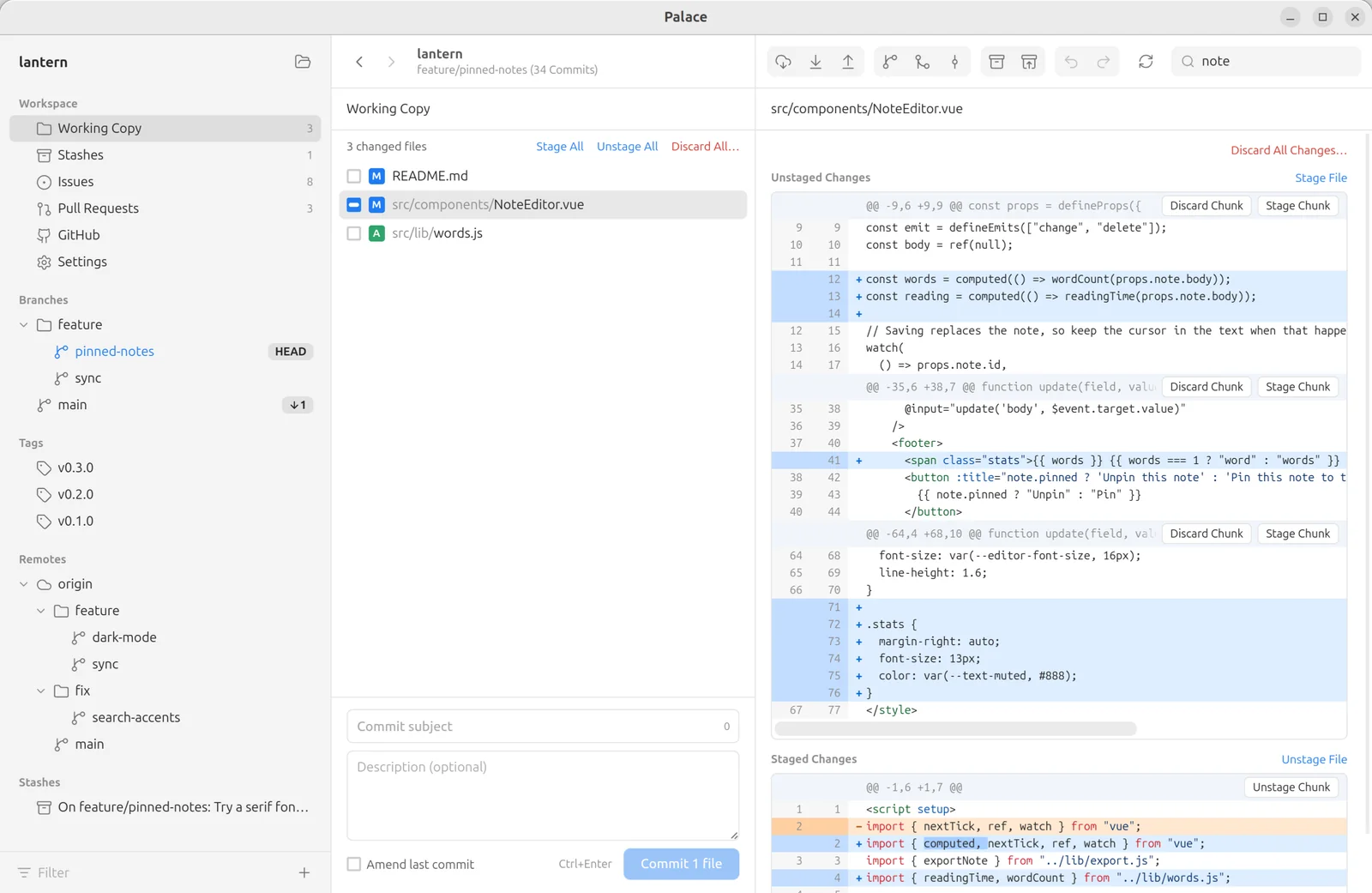
Stage exactly what you mean.
Stage, unstage or discard whole files, single chunks or individual lines, and turn a busy afternoon into clean, focused commits.
- Discarding a whole file moves it to the Trash, not into the void.
- Write the message, commit, or amend the last commit in place.
- Stash everything or just selected files, then apply or drop them from the Stashes view.
Branches
Merge, rebase and rewrite with a drag.
Drag a branch onto HEAD to merge it. Drag commits to reorder them and squash several into one, without an editor full of pick lines.
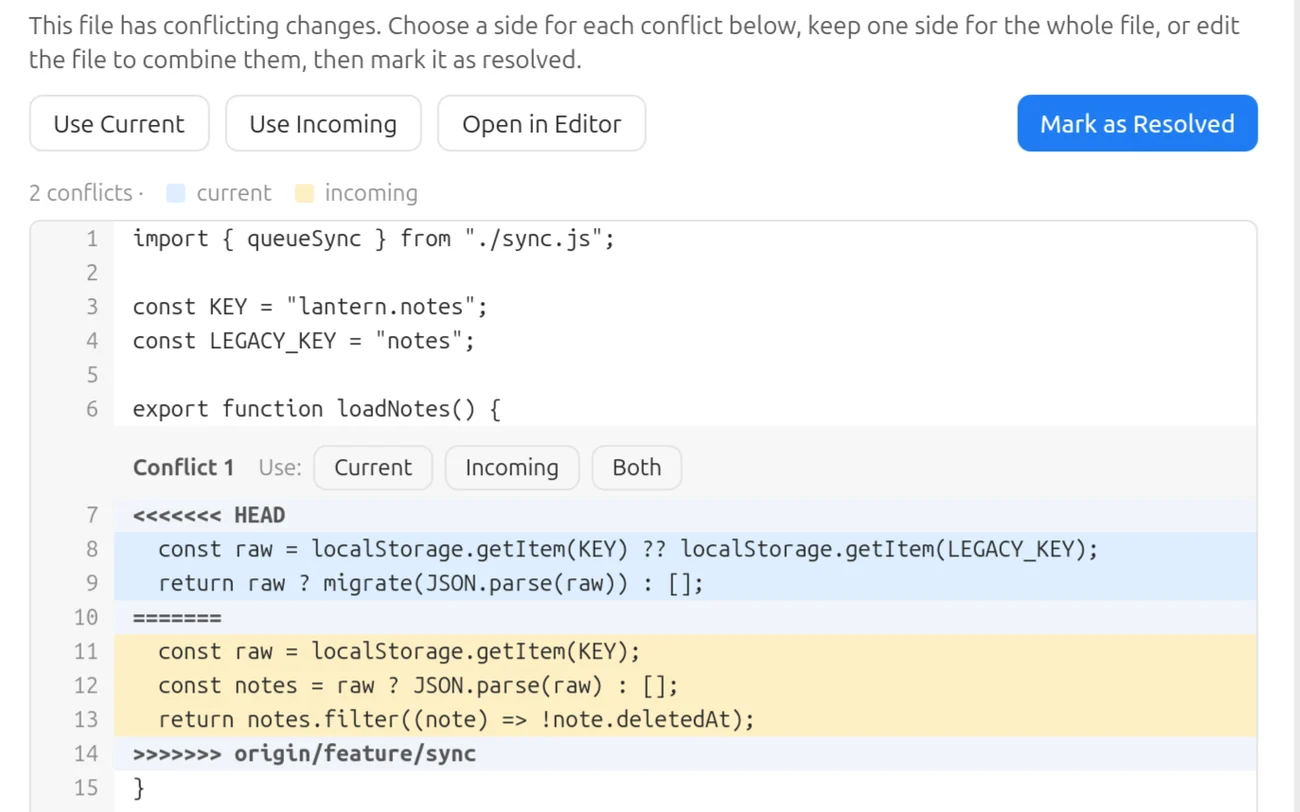
- Resolve conflicts one block at a time: take the current side, the incoming side or both, or decide for the whole file.
- Compare any two branches or tags: see the commits one has that the other doesn't, and every change it would bring.
- Rebase from the toolbar, and cherry-pick, revert and reset from a right-click.
- Create, rename, delete and publish branches — a new branch can go to the remote straight away.
GitHub
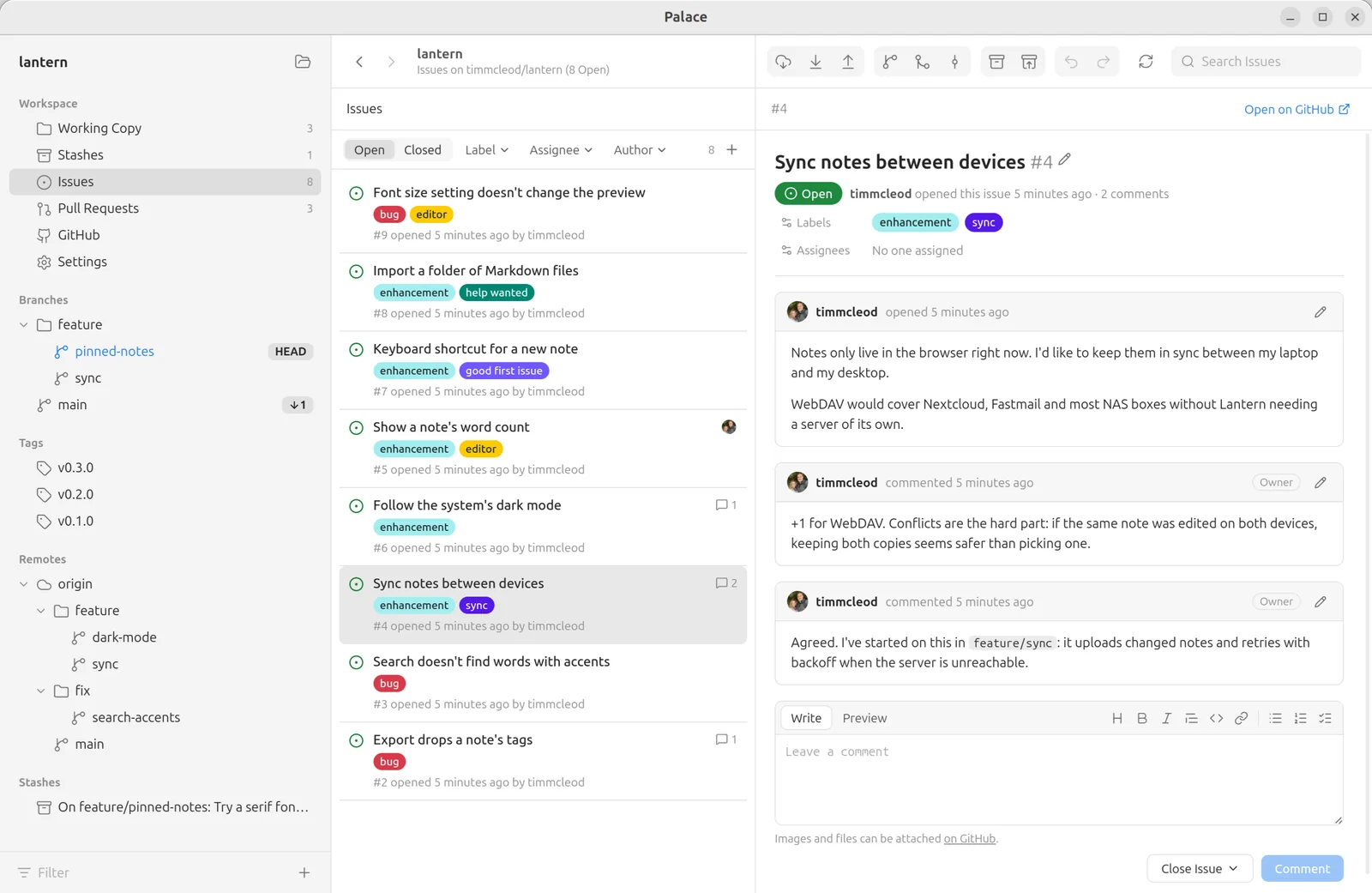
Issues and pull requests, next to your code.
Sign in to GitHub, and the repository's issues and pull requests are right there in the sidebar. No browser tab to keep open.
- Filter by label, assignee, reviewer or author, and search titles and descriptions.
- Read and write comments in Markdown, edit labels and assignees, and close or reopen.
- Create a pull request from a branch, see whether it can be merged, and merge it with a merge commit, a squash or a rebase.
Under the hood
Real Git underneath.
Palace runs your own git for every change. Nothing is reimplemented, so nothing behaves differently.
- Your hooks and commit signing run on every commit.
- Your SSH agent and credential helpers handle remotes.
- Your
.gitconfigapplies, exactly as it does in the terminal.
And more
Everything else, done carefully.
Fast and small
A native Rust core, not Electron. Large histories load quickly and page in as you scroll.
Live refresh
Changes made in the terminal or your editor show up immediately.
Light and dark themes
A clean light theme and a blue-gray dark theme. Diffs have a colorblind-friendly option.
Keyboard friendly
Arrow keys move through files and commits; Back and Forward retrace your steps.
Recent repositories
Switch between repositories from the sidebar, or create a new one.
Fetch, pull and push
One click each, with live progress and Cancel. Pull with merge or rebase; force push when you need it.
Tags and remotes
Create, push and delete tags. Add, rename and remove remotes. Delete remote branches.
GitHub account
Sign in to browse and clone your repositories, create new ones and manage SSH keys. Shows authors' profile pictures.
Automatic updates
Palace checks GitHub for new releases and installs them for you.
Download Palace
Free and MIT licensed, for 64-bit (x86-64) Linux and for macOS. Once it's installed, Palace finds new releases and updates itself.
.deb package
Ubuntu, Debian, Pop!_OS, Linux Mint, elementary
$ sudo apt install ./Palace_*.deb
Installs Git for you if it's missing.
Download .debAppImage
Any distribution
$ chmod +x Palace_*.AppImage
$ ./Palace_*.AppImage
Needs Git, plus libfuse2 on Ubuntu 22.04 and later (libfuse2t64 on 24.04 and later).
Also for macOS · macOS 11 or later, Apple silicon and Intel
Open the .dmg and drag Palace to Applications. It isn't signed by Apple yet, so the first time, go to System Settings › Privacy & Security and click Open Anyway.
Like Palace? Give it a star.
A star on GitHub is a quick way to say thanks, and it helps other developers find Palace.
Star Palace on GitHub